
DevStudy
PyQt5 본문
QFileDialog

파일 다이얼로그 (QFileDialog)는 사용자가 파일 또는 경로를 선택할 수 있도록 하는 다이얼로그입니다.
사용자는 선택한 파일을 열어서 수정하거나 저장할 수 있습니다. (QFileDialog 공식 문서 참고)
예제
## Ex 6-4. QFileDialog.

import sys
from PyQt5.QtWidgets import QApplication, QMainWindow, QTextEdit, QAction, QFileDialog
from PyQt5.QtGui import QIcon


class MyApp(QMainWindow):

    def __init__(self):
        super().__init__()
        self.initUI()

    def initUI(self):
        self.textEdit = QTextEdit()
        self.setCentralWidget(self.textEdit)
        self.statusBar()

        openFile = QAction(QIcon('open.png'), 'Open', self)
        openFile.setShortcut('Ctrl+O')
        openFile.setStatusTip('Open New File')
        openFile.triggered.connect(self.showDialog)

        menubar = self.menuBar()
        menubar.setNativeMenuBar(False)
        fileMenu = menubar.addMenu('&File')
        fileMenu.addAction(openFile)

        self.setWindowTitle('File Dialog')
        self.setGeometry(300, 300, 300, 200)
        self.show()

    def showDialog(self):
        fname = QFileDialog.getOpenFileName(self, 'Open file', './')

        if fname[0]:
            f = open(fname[0], 'r')

            with f:
                data = f.read()
                self.textEdit.setText(data)


if __name__ == '__main__':
    app = QApplication(sys.argv)
    ex = MyApp()
    sys.exit(app.exec_())
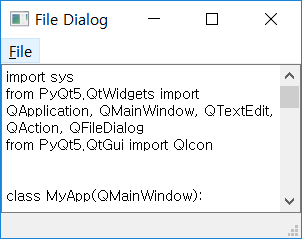
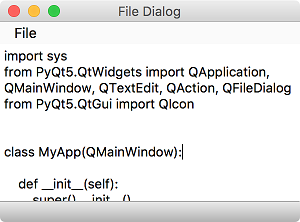
메뉴바, 텍스트 편집, 상태바 위젯을 배치했습니다. 메뉴에는 파일을 선택하기 위한 ‘Open’ 메뉴가 있습니다.
선택한 파일의 내용을 텍스트 편집 위젯으로 불러옵니다.
설명
fname = QFileDialog.getOpenFileName(self, 'Open file', './')
QFileDialog를 띄우고, getOpenFileName() 메서드를 사용해서 파일을 선택합니다.
세번째 매개변수를 통해 기본 경로를 설정할 수 있습니다. 또한 기본적으로 모든 파일(*)을 열도록 되어있습니다.
if fname[0]:
    f = open(fname[0], 'r')

    with f:
        data = f.read()
        self.textEdit.setText(data)
선택한 파일을 읽어서, setText() 메서드를 통해 텍스트 편집 위젯에 불러옵니다.
결과
'기타' Related Articles
more


